Cold email for HR tech. Give the demo a buying question.
Cold email for HR tech should start with a conversation about a defined HR workflow, not a request to watch an entire platform. ReplyLead manages cold email and LinkedIn. This guide connects 4 example workflows to the people, demonstration scope and unanswered questions that make an initial product discussion useful.
A recruiting product, an onboarding workflow, a payroll tool and a workforce-planning system solve different problems. Start with what your product actually supports. Then identify the operational owner, likely users and the people who would need to review dependencies. Confirm those responsibilities in conversation.
Workday's published HCM portfolio separates talent acquisition, human resource management, workforce management and payroll. That is an example of distinct product categories, not a claim that every vendor covers them or that ReplyLead has a relationship with Workday. See the Workday product overview.
01
Recruiting operations
Start with the recruiting step your product changes: intake, scheduling, handoff or another defined task. Confirm the recruiting-process owner and relevant system administrator. A public job opening does not prove an ATS replacement project.
02
Employee onboarding
Clarify which tasks begin after an accepted hire and which teams participate. HR operations, IT and hiring managers may have different responsibilities. Do not describe a workflow as automated across systems until your product team has confirmed the specific scope.
03
Payroll operations
Define the administrative task and supported countries before researching accounts. Identify payroll ownership and any finance or system-review participants. A general product demo cannot establish country coverage, payroll accuracy or suitability for a live pay run.
04
Workforce scheduling
Identify which teams, locations and scheduling decisions are in scope. The daily user and organization-wide buyer may differ. A large employee count does not tell you whether the business has the workflow your product addresses.
FROM INITIAL INTEREST TO A FOCUSED REVIEW
Build a demo around one buying question.
A useful first agenda makes the workflow, example and unresolved dependency visible. It does not require the prospect to send employee or candidate records to a prospecting tool.
A FIRST AGENDA
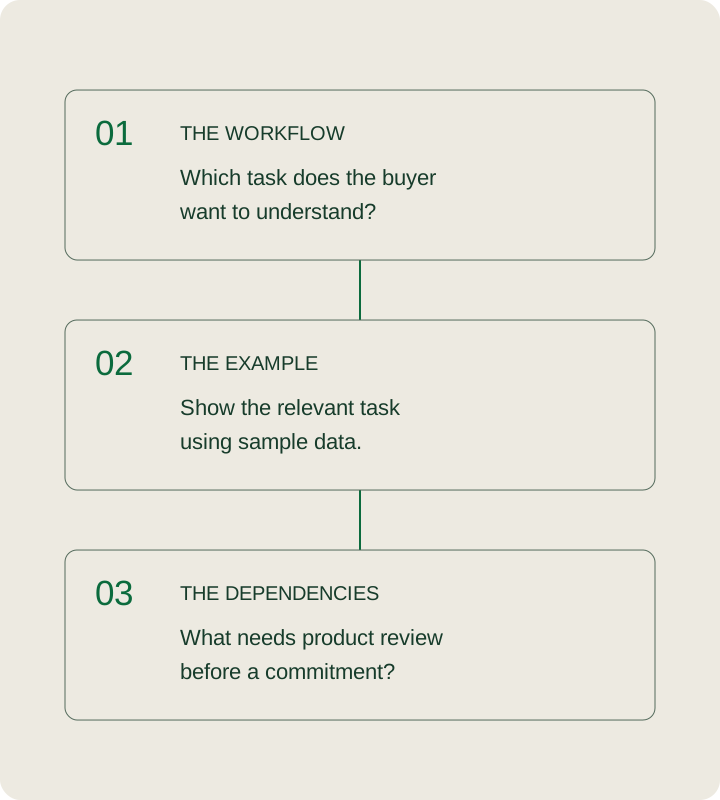
Start with the workflow under discussion.
Confirm the task. Name the step the buyer wants to understand.
Show an appropriate example. Use sample data and demonstrate only the relevant workflow.
Keep dependencies visible. Agree what must be checked before any implementation commitment.
No meeting, integration or product fit is verified by this planner.
Predefined choices only. No employee data, candidate data, account names or private system details are entered.
Use research to ask a better question. Keep the buying project unproven.
Research evidence and its limits for HR-technology prospecting
Research input
What it can support
What still needs confirmation
Published hiring activity
A dated observation about roles being advertised.
The recruiting problem, product need, process ownership and whether the roles remain open.
A public technology reference
A question about the referenced system and relevant workflow.
Current usage, modules, contract timing and actual integration requirements.
A location or workforce announcement
A question about the announced operational change.
Which employees, locations and workflows are affected, and whether a software project exists.
A contact's HR or operations title
A starting point for identifying a participant.
Decision responsibility, day-to-day ownership and the right technical or procurement reviewer.
Research the account and buying situation before choosing a generic senior title. Preserve the source date and scope. If you already have a qualified account list, reuse that approved fit assessment; do not restart it merely because technical questions remain unanswered.
Keep the first message focused on one relevant workflow. Your team must substantiate any claim about supported systems, country coverage, automation, time saved or implementation effort. A feature name in a product brochure is not evidence that the feature works in a particular prospect's environment.
A demo handoff should carry the question, not just the calendar slot.
Context for the account executive
The organization and agreed account-fit criteria.
The workflow and the prospect's stated reason for discussing it.
The participant's reported role and any requested introduction.
The current process or system, marked unconfirmed where necessary.
Timing, meeting acceptance and the agreed next step.
Context for the product specialist
The task to demonstrate using an appropriate sample.
Requirements the product team has actually confirmed.
Known limitations and unresolved dependencies.
Questions that need a specialist before any commitment.
What a useful outcome of this first discussion would be.
Use the B2B reply-to-handoff checklist to keep interest, participant fit, timing and an accepted next step separate. Sending an invitation does not mean the recipient accepted it. An accepted meeting does not mean an integration has passed technical review.
HYPOTHETICAL EXAMPLE / NOT A CLIENT RESULT
The buyer wants to improve interview coordination. The integration is unconfirmed.
A recruiting leader agrees to discuss a scheduling workflow. The account executive records that interest and the agreed time. The product specialist prepares a sample-data demonstration and marks the current recruiting-system connection as an open question.
The meeting can establish whether a deeper review is worthwhile. It should not begin with a promise that the prospect's system is supported. If the product team identifies an unsupported dependency, disclose the boundary and change the discussion scope rather than hiding it to preserve the booking.
Before the handoff, match the next message to the buyer's actual request. The software-sales CTA finder separates a first introduction, requested product information, technical review, meeting scheduling and an explicit stop.
Managed outbound. Your team owns product commitments.
ReplyLead manages targeting, list research, sending infrastructure, messaging, reply handling and the agreed handoff through cold email and LinkedIn. Your team supplies account criteria, supported product claims, exclusions and sales availability. Your product and sales teams own technical demonstrations, integration commitments, proposals and closing. See how ReplyLead's managed process works.
Agree supported countries, languages, business sizes and workflow boundaries before launch. Exclude current customers, open opportunities, organizations outside your product scope and contacts who should not receive outreach. Launch requires suitable infrastructure, approved messaging and handoff capacity; new sending domains may need weeks of reputation-building.
The published commercial model is a monthly technology and infrastructure fee plus an agreed share of attributable closed revenue. The fixed cost remains when nothing closes. Confirm attribution, existing-relationship exclusions and scope in writing through current pricing. No implementation partner or named HR-software partnership is included here.
Evaluate the demo cohort after the meeting.
Keep relevant replies, accepted invitations, booked meetings, held demos, accepted opportunities and closed contracts distinct. Record which workflow each discussion concerned and why sales accepted or rejected the handoff. A duplicate invitation or reschedule does not create another opportunity.
Compare cohorts with the same account criteria and allow for the sales cycle. Product fit, attendance, review progress and opportunity acceptance matter alongside the count of meetings. No HR-tech ReplyLead conversion benchmark is established here. Use the SaaS acquisition-economics guide for its separate cost and conversion model; do not use its hypothetical inputs as your results.
When this workflow does not fit.
This is B2B prospecting for HR-technology vendors. It is not a job-application service, candidate sourcing campaign or HR advice for employees. The planner does not validate integrations, legal obligations, payroll rules or security controls.
If the buyer's required workflow is unsupported, disclose that limitation before asking for a product evaluation. If the buying project or participant is unclear, use a short scoping discussion instead of an indiscriminate platform tour. Countries and product availability must be confirmed for the actual campaign.
How the agenda builder makes its recommendation.
The workflow selects an example task and likely participants to confirm. The buying context changes the initial scope question. A known unsupported dependency takes precedence over a favorable meeting status. Unconfirmed dependencies remain open; a confirmed scope does not become a promise beyond the product team's review.
The meeting selector reports whether a next step has been accepted, without creating an event. These are ReplyLead's recommended planning rules, not an AI evaluation of the buyer, a lead score or a prediction of revenue. The example agenda is readable without JavaScript.
Questions about cold email for HR tech.
How should HR-tech vendors use cold email?
Start with a specific workflow and a relevant business audience. Research the account, confirm who owns that task and use a focused conversation to establish whether a product discussion is useful. Do not infer a buying project from a job title or hiring announcement.
Who should attend an HR-software demo?
Confirm the operational owner and the participant who can evaluate the task. Bring a product or system specialist when dependencies need review. A senior HR title alone does not establish responsibility for the particular workflow.
Does a demo request mean the lead is qualified?
No. Interest, account fit, participant responsibility, timing and an agreed next step are separate facts. A booked demo is also different from attendance or an accepted sales opportunity.
Should a first demo use real employee data?
This planning tool accepts no employee or candidate information. A sample-data demonstration can establish the initial workflow discussion. Any later use of real data requires a separately agreed process and the appropriate reviews.
What if the buyer uses a system we have not confirmed?
Keep the dependency unconfirmed and ask the product team to review it. Do not claim compatibility based on a public technology reference. A known unsupported dependency must be disclosed before a product-fit commitment.
Can the campaign cover multiple countries?
Confirm product availability, supported workflows, delivery languages and outreach requirements for each market. A generic HR product category or large database does not establish country-specific capability.
What does ReplyLead manage for an HR-tech campaign?
ReplyLead manages the agreed targeting, research, cold email and LinkedIn execution, reply handling and sales handoff. Your team owns product claims, technical demonstrations, proposals and closing. Current pricing includes a monthly technology fee and an agreed revenue share.
Sources and evidence boundaries.
ReplyLead: how it works - cold email and LinkedIn scope, campaign work and infrastructure readiness. Checked 17 October 2026.
ReplyLead: pricing - fixed monthly technology cost and agreed revenue share. Checked 17 October 2026.
ReplyLead: B2B qualification - evidence boundaries between interest and the accepted next step. Checked 17 October 2026.
Workday: human capital management - an example of distinct HR product categories; no partnership, compatibility or performance claim. Checked 17 October 2026.
The agenda, research boundaries and hypothetical example are original operational guidance. No client result, market-size estimate or product endorsement is presented.
Put the workflow before the demo count.
Bring the product scope, the accounts you can serve and the sales conversations your team would accept. We can discuss a focused outbound program around them.