Confirmed fit
For each usable field, multiply its weight by 1 for a match, 0.5 for partial fit or 0 for a mismatch. Add the results. Keep the denominator fixed at 100.
REPLYLEAD / ACCOUNT SELECTION LAB
A good-fit account and a well-documented account are not always the same thing. Build an explainable scorecard before you build the campaign.
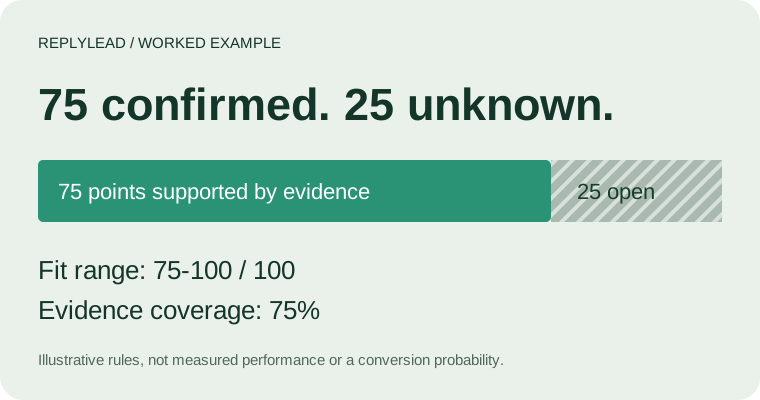
An ICP scoring calculator assigns weighted points to a company's fit with your ideal customer profile. In this editable 100-point example, 75 confirmed points plus 25 unknown points produces a 75-100 score range at 75% evidence coverage. It goes to research before outreach under the default rules.
01 / BUILD YOUR SCORECARD
Start with the example below, then replace the acceptance rules with your own. A fit selection records your judgment; the tool does not research or verify a company. Weights must total 100. These defaults illustrate the method and are not performance benchmarks.
Revenue and headcount can both proxy company size. Avoid double-counting size: reduce one weight when the same evidence drives both. Define headcount at the buying-entity level, consistently with revenue.
Download the worked example CSV / Download a blank evidence worksheet
02 / WHY ONE NUMBER IS NOT ENOUGH
Imagine all three known fields match, worth 75 points, while revenue is unknown and worth 25. Dividing only by the known weights gives 75 / 75 = 100%. That number hides a quarter of the scorecard.
Keep the full 100-point denominator. Report 75 confirmed points, 25 unresolved points and 75% weighted evidence coverage. Missing evidence becomes a research task instead of a silent pass or a confirmed rejection.
The range is a bound under your selected rules, not a statistical confidence interval. Its upper end assumes every unknown field eventually matches.
03 / REVENUE IS A SIZE SIGNAL
Start from the customers your team can serve profitably. Document currency, annual period and whether a number describes the parent company or the buying entity. Set boundaries before viewing a prospect, so the rubric does not move to fit the result. Define your firmographic fields and bounds first.
For a US public company, the annual Form 10-K is a starting source. Check the reporting period and entity scope rather than substituting a parent-company total for a subsidiary. For a private company, retain the estimate source and flag unresolved ranges.
| Annual revenue in USD | Fit selection | Points of 25 | What to verify |
|---|---|---|---|
| 10M to under 50M | Matches | 25 | Period, source and buying entity |
| 5M to under 10M; 50M to under 100M | Partial | 12.5 | Whether the adjacent band is commercially viable |
| Under 5M; 100M or above | Outside | 0 | A mismatch with this example, not a bad business |
| Missing, conflicting or stale | Unknown | 0 confirmed; up to 25 possible | Research before deciding |
These bands are a worked example, not ReplyLead eligibility rules. Change them for your actual market. A vendor estimate that spans a boundary should remain unknown until your team resolves it; do not silently pick its midpoint.
If your current model uses +25, +10 and -10 revenue points, document the meaning and total range before comparing it with this non-negative 0-100 model. This tool uses full, half and zero credit; a hard exclusion is a separate veto. The scoring systems are not interchangeable.
04 / AN AUDITABLE METHOD
For each usable field, multiply its weight by 1 for a match, 0.5 for partial fit or 0 for a mismatch. Add the results. Keep the denominator fixed at 100.
Add the weights of known, usable fields, including confirmed mismatches. Unknown or flagged-for-recheck fields are excluded from coverage and retain their weight in the possible-score bound.
A hard exclusion wins. Otherwise, research when coverage is below your minimum; shortlist when confirmed fit reaches your threshold; research if unknowns could change the decision; deprioritize when even the upper bound misses it.
All-zero weights, a total other than 100, blank numerical settings and out-of-range settings are rejected. Exports include the rules, weights, observed selections, recheck flags, threshold, model version and calculated output. The tool does not store inputs between visits.
HubSpot's scoring documentation distinguishes property-based fit from engagement. We keep this calculator focused on account fit; email opens, website activity and buying intent are not scored here.
05 / EARN THE RIGHT TO AUTOMATE
Write a model version and freeze it for a review window. Score accounts using information available before outreach. Keep later outcomes out of the inputs. Compare accepted opportunities and disqualification reasons across score bands, with the account count and observation period visible.
| Record | Why it matters | Common error |
|---|---|---|
| Account identifier and buying entity | Deduplicate the unit being ranked | Counting several contacts as several accounts |
| Source, observed date and recheck rule | Make evidence usable at scoring time | Using a later outcome as an earlier signal |
| Model version, score range and coverage | Reproduce the decision | Changing weights mid-cohort |
| Outreach status and qualified outcome | Separate selection from execution | Treating an uncontacted account as a failed lead |
There is no universal winning threshold in this tool. Small cohorts can produce unstable percentages. Keep a dated comparison cohort, inspect false positives and false negatives, and revise one model assumption at a time. Use the list-building workflow for sourcing and verification after account selection.
ICP criteria scoring ranks companies against a written ideal customer profile using weighted fit criteria. This calculator separates observed fit, unknown evidence and hard exclusions. It does not predict the chance of a sale.
Write non-overlapping annual revenue bands in one currency and accounting period, then assign full, partial or zero fit within your revenue weight. Keep unverified or conflicting revenue unknown. Revenue is one size signal, not proof of budget or purchase intent.
It contributes zero confirmed points but keeps its full weight in the possible score. With a 25-point revenue weight and 75 confirmed points elsewhere, the score is 75 to 100 with 75% evidence coverage. That is different from a confirmed mismatch.
No. These are transparent planning rules with editable weights and thresholds. Validate them on your own dated account outcomes before using them for prioritization. The score is not a conversion probability.
The calculator runs locally in your browser and does not submit its inputs. Downloads are created on your device. Site analytics record tool actions without acceptance rules or account evidence.
A filter decides whether a company passes fixed bounds. This calculator compares weighted fit, exposes missing evidence and exports a decision record. Use the existing firmographic guide to define fields and bounds first.
This is a configurable decision worksheet. It does not enrich companies, validate email addresses, establish permission to contact someone, connect to a CRM or estimate conversion probabilities. Your selections remain judgments unless supported by evidence. The default weights are illustrative and are not fitted to ReplyLead campaign results.
For hard field boundaries, use the firmographic filter. For email authentication, use the deliverability checker. For campaign economics, use the ROI calculator. Different tools answer different decisions.
Checked 25 September 2026. ReplyLead designed the displayed worksheet and calculated its examples. These sources support the concepts; they do not validate the default weights or predict results.
FROM A SCORECARD TO A CAMPAIGN
ReplyLead runs B2B cold email and LinkedIn outreach. Bring the account criteria, exclusion rules and qualification definition; review how they fit the campaign workflow.
See how ReplyLead works Discuss your account criteria