Honor known exclusions.
A suppression record takes precedence over a duplicate or favorable verification result. Keep the exclusion in the sending system; removing its row from a spreadsheet must not erase the reason it was excluded.
LIST OPERATIONS / KEEP THE REASON WITH THE RECORD
Email list cleaning reconciles address records, duplicates and exclusions before a campaign. For B2B outbound, it should preserve the reason behind each decision. A well-formatted address is not a verified mailbox, permission to email or a qualified buyer.
PreserveKeep every input row in the review.
ExplainGive each row one primary outcome.
SeparateCleaning does not verify a mailbox.
01 / A WORKING LEDGER
Paste one address per line, then add the addresses you already need to exclude. The review shows repeated records, suppression matches and unresolved formatting. It does not contact mail servers.
Up to 2,000 nonblank rows. Paste only email addresses, without names or CSV headers.
Use your current exclusion records. Leaving this blank does not check exclusions elsewhere.
These boxes are processed in this tab. Their contents are not uploaded, saved by this tool or added to analytics. Tool-use events contain no addresses. Clearing removes the working lists and report from this interface.
Review the lists, then reconcile. No address is checked or sent over the network.
YOUR ROW REVIEW / NOT A SEND LIST
The four counts partition input rows, not people or companies. An address can still be uncontactable or excluded for a reason not supplied here.
| Line | Address | Outcome | Reason |
|---|
A record of every row and reason, not an approved campaign list. Potential spreadsheet-formula cells receive a protective apostrophe in the export.
02 / A SMALLER FILE IS NOT THE GOAL
Cleaning should make the next operational decision clear. A repeated row, an unsubscribe and an unfamiliar address format need different actions. Deleting all three under a generic "bad lead" label loses the evidence your team needs and can undo decisions that were already made correctly.
A suppression record takes precedence over a duplicate or favorable verification result. Keep the exclusion in the sending system; removing its row from a spreadsheet must not erase the reason it was excluded.
Repeated addresses can carry different source dates, owners or campaign history. Choose a master record and preserve useful history. Never combine two people just because their names or companies resemble one another.
A display name, quoted mailbox, internationalized address or incomplete paste can fall outside this tool's simple format. That is a review item, not proof the mailbox is invalid. Return to the original source instead of guessing a correction.
A valid contact address and a relevant prospect answer different questions. If the account list is already qualified, preserve that decision. Repair the address record without restarting company-fit or contact-authority scoring.
Do not automatically remove plus tags, strip dots or change the spelling before @. Provider-specific conventions are not universal identity rules. RFC 5321 requires preserving the case of the mailbox local part; domain names are case-insensitive. See the SMTP specification.
03 / RECONCILE THE DENOMINATOR
The workbench example uses documentation addresses, not real prospects. It contains eight nonblank rows: two match the supplied suppression address, two are repeated rows, one needs format review and three have no match found by these local checks. Those three remain unverified.
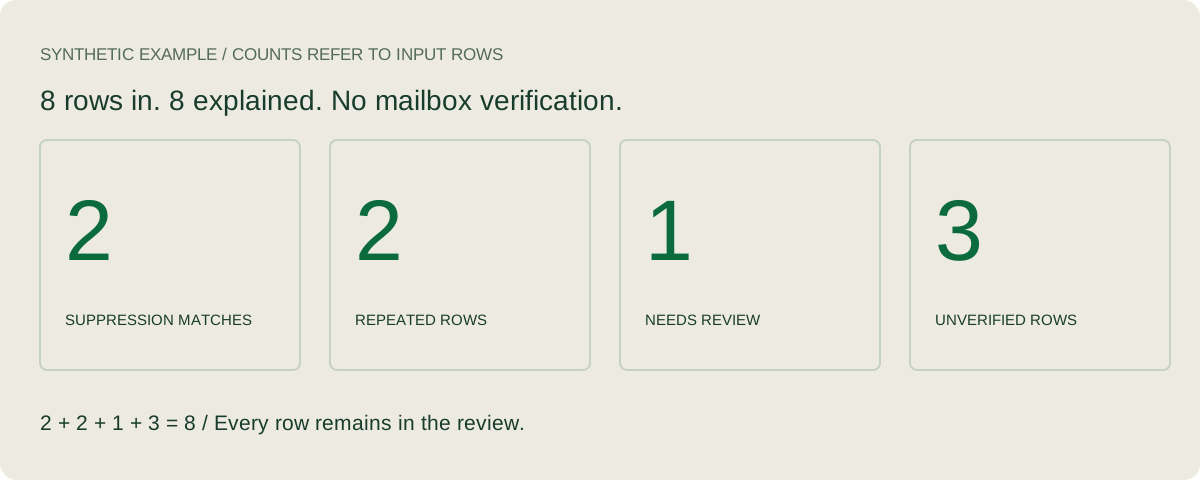
Notice that stop@example.com and STOP@example.com both remain excluded in this example. The suppression match ignores letter case as a conservative exclusion rule. The repeated address is not quietly returned to a usable list. By contrast, unsuppressed local-part case variants are flagged for review rather than merged.
For exact duplicates, the domain is lowercased but the mailbox local part is preserved. The tool treats alex@example.com and alex@EXAMPLE.com as the same address. It does not collapse jane+event@example.com into jane@example.com.
04 / FROM REVIEW TO OPERATION
Record where the list came from, its date and the team responsible for it. Preserve approved targeting and existing client, partner or active-opportunity exclusions. Lead list building addresses the separate sourcing task.
Reconcile your sending platform and CRM before a campaign starts. Check the scope of an exclusion: address, person, company or a particular campaign. This tool accepts address exclusions only; it cannot discover a company-level do-not-contact decision.
Keep the verification provider, method, result and timestamp. A syntax check does not perform DNS or SMTP checks, and a favorable server response is not a promise of delivery. See why verified lists still bounce for the separate operational issue.
Import and review the final records in the system that will send. Check matching rules and existing campaign membership so the same person does not receive overlapping approaches. Keep a dated reconciliation report and an owner for unresolved cases.
Route opt-outs, address changes and delivery failures back into the shared record. A later list import should not resurrect a known exclusion. Use reply categories and next actions to keep refusals, referrals and interest separate.
Google's published Gmail guidance includes unsubscribe requirements for relevant marketing and subscribed messages. Follow the applicable current sender requirements; a cleaned file alone does not establish compliance or permission. Read Google's sender guidance.
05 / MEASURE THE JOB YOU ACTUALLY DID
Start with the input row count. Report duplicates, suppression matches and unresolved rows with clear definitions. Keep the original record IDs so someone can reproduce each decision. A lower file size is not automatically a better list.
The workbench's four totals add back to its nonblank input rows. They do not sum unique recipients, account coverage or prospective customers. Multiple addresses may belong to one person, and one shared address may serve several people.
For sending performance, use the actual sending platform's delivery and bounce definitions, matched windows and consistent denominators. Record other changes to infrastructure, message or audience. A before/after change does not isolate the effect of cleaning.
Track relevant replies, held meetings and accepted opportunities separately. This page establishes no universal bounce target, expected lead volume or revenue gain. A local report cannot measure those outcomes.
06 / WHERE REPLYLEAD FITS
ReplyLead's managed B2B outbound covers targeting, list building, sending infrastructure, cold email and LinkedIn, messaging, reply handling, qualification and meeting coordination within the agreed scope. Your team owns the sales conversation and close. Discuss your target companies, delivery markets, existing relationships and exclusion rules before launch.
The published commercial model includes a monthly technology and infrastructure fee plus an agreed share of attributable closed revenue. The fixed infrastructure cost remains when no deal closes. Confirm the scope, fees, attribution and exclusions in writing; this tool does not change those terms. Review pricing and the operating methodology.
This is useful when a team needs a repeatable prospecting process and someone accountable for maintaining the working records. If you only need a mailbox-validation API or a one-off address check, the workbench does not supply that service. Setup depends on the agreed market, source data, messaging and sending readiness; no launch date is promised here.
METHOD / SCOPE / SOURCES
The tool accepts one plain ASCII address per line, trims surrounding whitespace and ignores blank lines. It supports a limited dot-atom format; unsupported syntax goes to review. Both inputs are limited to 2,000 nonblank rows and 256,000 characters. It retains the original line number and trimmed input in the report.
Every row receives one primary outcome in this order: unsupported format needs review; a case-insensitive suppression match stays excluded; an unsuppressed local-part case-variant group needs review; a repeated normalized address is a duplicate; the remaining rows are unverified. A malformed suppression entry stops the report so an exclusion cannot silently disappear.
The browser preview displays up to 100 rows. The downloaded CSV contains all reviewed rows and their reasons. Edits invalidate the old result until you run the check again. The tool has no account access, DNS lookup, SMTP probe, sending capability or CRM integration. It does not inspect domain suppression, bounce history, spam traps or mailbox ownership.
Email list cleaning reviews address records, duplicates and exclusions before a campaign. It should preserve the source and reason for each decision. Cleaning does not by itself verify a mailbox, establish permission or qualify a buyer.
No. Record cleaning addresses list consistency, duplicates and suppression. Verification uses a stated method to check an address or domain at a particular time. This browser tool does not run DNS or SMTP checks and does not return a deliverability verdict.
No. These inputs are processed in this browser tab and are not uploaded or saved by the tool. Its analytics events do not contain addresses. The downloadable review is created locally; it contains the addresses you entered, so store it appropriately.
Do not apply provider-specific identity rules to every domain. This tool preserves dots, plus tags and mailbox-local-part case. It normalizes domain case for duplicate detection and flags unsuppressed local-part case variants for review. Suppression matching ignores case as a conservative exclusion rule.
Suppression takes precedence. Both rows remain marked as suppression matches in the report. A repeated row does not override an exclusion, and no row is deleted from the review.
No. They are unverified rows with no duplicate or supplied suppression match found. The tool does not check mailbox existence, company-level exclusions, existing campaign membership, permission, qualification or the sender configuration.
Reconcile current exclusions and changes before using a list and maintain them as new replies or delivery events arrive. Set a verification refresh policy appropriate to the source and use. This page does not prescribe a universal monthly interval or claim that an old result remains current.
Bring your market, current process and exclusion requirements to a conversation about managed outbound.
Discuss your prospecting process